Vibe Coding Lessons with Cursor
Lessons from vibe coding at scale with a growing codebase: planner/executor separation and keeping the AI on rails.
🧵 TL;DR
Managing a large codebase with AI agents (like in Cursor) is powerful — but only if you give your AI clear tracks to run on. I use planner/executor separation, contextual rules, changelogs, and scratchpads to ensure agents stay aligned with my intentions. Think of your codebase like a railway system: agents are fast trains, but they still need tracks, signals, and maps.
When your codebase starts sprawling across multiple layers — frontend, backend, database, CI/CD — bringing AI into your development flow can feel like inviting a hyper-intelligent intern into a filing cabinet on fire. Without structure, documentation, and rules, even the best agents will derail.
That’s why, over the past month, I’ve worked to make my system not just AI-friendly, but AI-guided. Using Cursor, agents, and a few battle-hardened strategies, I’ve created a development workflow that’s not only scalable, but legible to intelligent tools.
Here’s how I keep my AI coding experience “on rails.”
🚆 The Metaphor: Coding at Scale Is a Train System
Think of your development workflow like a railway network:
- The AI agent is your high-speed train — powerful, capable, but needs structure.
- Your codebase is the terrain — sprawling, layered, sometimes undocumented.
- Rules, context, and changelogs are the tracks and signals — they guide the agent.
- Scratchpads and planners are dispatch stations — they direct traffic and retain memory.
If the rails are broken or missing, your train crashes. If the stations don't coordinate, your trains collide. That’s why structure matters.
🧠 Core Agentic Practices I Use in Cursor
1. Planner + Executor Roles
Instead of expecting a single agent to do everything, I break it up:
- Planner defines the goal and the plan.
- Executor handles atomic actions with guardrails.
This separation lets me give focused context and keeps the AI from going rogue.
2. Contextual Cursor Rules
I define per-directory rules that explain:
- The purpose of the folder
- When files should be updated
- What the agent should not change
It’s like writing a mini README.md that trains the agent on your conventions.
3. Changelog Discipline
Every time a significant change is made:
- I update
docs/CHANGELOG.md - I include version numbers, dates, and summaries
- I link back to scratchpads or rules
This provides a historical trail that AI agents (and future me) can follow.
4. Scratchpads for Every Initiative
Each major effort gets a scratchpad that includes:
- A clear goal
- Problems being solved
- Step-by-step plan
- Lessons learned
It keeps Cursor agents (and me) aware of the full context over time.
5. Executable Documentation
When I update the API or SQL schema, I regenerate:
SCHEMA_OVERVIEW.mdxSTACK_FLOW.mdxEXECUTION_TRACE.mdx
This keeps the architecture legible to agents. I even use LLMs to generate Mermaid diagrams from my schema.
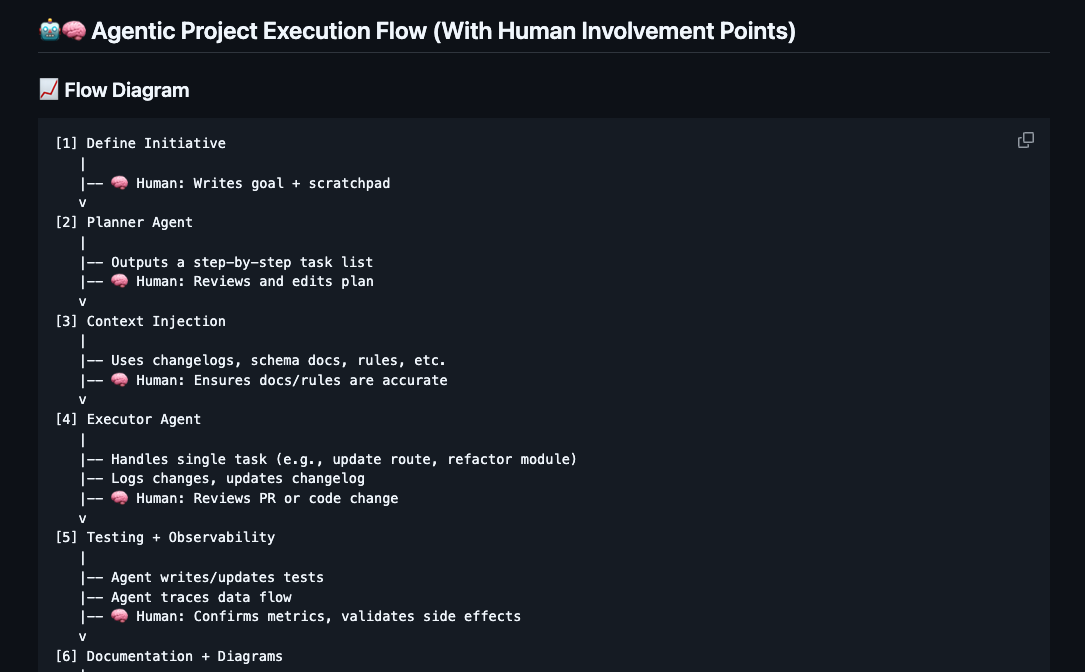
🤖🧠 Agentic Project Execution Flow (With Human Involvement Points)
📈 Flow Diagram
[1] Define Initiative
   |
   |-- 🧠 Human: Writes goal + scratchpad
   v
[2] Planner Agent
   |
   |-- Outputs a step-by-step task list
   |-- 🧠 Human: Reviews and edits plan
   v
[3] Context Injection
   |
   |-- Uses changelogs, schema docs, rules, etc.
   |-- 🧠 Human: Ensures docs/rules are accurate
   v
[4] Executor Agent
   |
   |-- Handles single task (e.g., update route, refactor module)
   |-- Logs changes, updates changelog
   |-- 🧠 Human: Reviews PR or code change
   v
[5] Testing + Observability
   |
   |-- Agent writes/updates tests
   |-- Agent traces data flow
   |-- 🧠 Human: Confirms metrics, validates side effects
   v
[6] Documentation + Diagrams
   |
   |-- Agent generates Mermaid / ER diagrams
   |-- 🧠 Human: Publishes or revises for clarity
   v
[7] Deployment or Next Step
   |
   |-- Agent proposes next task from plan
   |-- 🧠 Human: Decides whether to continue, pivot, or pause
🧠 Human Involvement Summary
| Stage | Human Role |
|---|---|
| Initiative Definition | Write scratchpad, define goals |
| Plan Review | Validate or edit agent-generated steps |
| Context Curation | Keep changelogs, rules, docs accurate |
| Code Review | Review AI-generated code before merge |
| Impact Validation | Validate behavior, performance, side effects |
| Documentation Review | Final pass on AI-generated docs or diagrams |
| Strategy + Direction | Prioritize roadmap, resolve ambiguity |
🧪 What This Enables
With these systems in place, I can:
- Ask agents to trace data flow from frontend → backend → DB
- Refactor with confidence across multiple layers
- Auto-document as I go
- Catch performance bottlenecks by correlating logs
It’s not just helpful — it’s agent-ready engineering.
🧩 Lessons Learned
- Agents are powerful, not magical. They need structure, just like junior devs.
- Scratchpads are underrated. They’re memory for both you and your agents.
- Documentation isn’t overhead — it’s fuel. Especially for AI.
- Start small, scale smart. Add one rule, one changelog, one scratchpad — then build from there.
📊 Bonus: LinkedIn Poll
To go with the public post, I asked:
"What’s the hardest part of managing AI agents in a large codebase?"
Top answers:
- Giving agents the right context
- Avoiding hallucinations and mistakes
- Trusting AI with critical changes
This confirmed what I’ve been learning firsthand: context is everything.
Final Thoughts
Agentic coding isn’t about replacing devs — it’s about augmenting them. But just like humans, AI performs best with structure, feedback, and clarity.
If you treat your codebase like a railway system and your AI like a train that needs rails — you’ll build systems that are fast, safe, and scalable.